What is built today, and what comes next.
This page lists what RevRake does today and what it does not do yet. It is updated whenever the product changes.
In the product now.
Tracking
Links your affiliates share, served from track.revrake.com.
- Tracking links with click IDs and a btag
- Every click is stored with its own click ID before the visitor is sent to your site. The landing URL carries the click ID and a
btagnaming the affiliate and the link. Up to five sub-IDs and the ad click IDs of Google, Meta, Microsoft and TikTok (gclid,wbraid,fbclid,msclkid,ttclid) are stored with the click. - UTM pass-through
- UTM tags on a tracking link are stored with the click and passed on to your landing page.
- Bot and repeat-click flagging
- Suspect clicks are flagged and kept, never silently dropped. They are counted separately from clean clicks.
- Device details per click
- Each click records the kind of device, the operating system and the browser.
- Clear error pages
- A broken tracking link, a link whose program has no landing page yet, an unknown page and a server error each show a short page in the visitor's language instead of a bare error. While the service restarts, the page tries again by itself after 20 seconds.
- Load tested
- Tested on the production server: 1,000 clicks a second and 300 player events a second, ten minutes each, with nothing lost. With 100 million clicks stored, every report and dashboard answers in under half a second, and a full day of events and daily files sent twice pays nobody twice.
- Site verification
- You prove that the site your links land on is yours, with a DNS record or a meta tag. Until then, a visitor sees a short page saying where a link leads before going on.
- A page to report a link
- Anyone can report a tracking link that is being misused, on a public page.
- Short link names
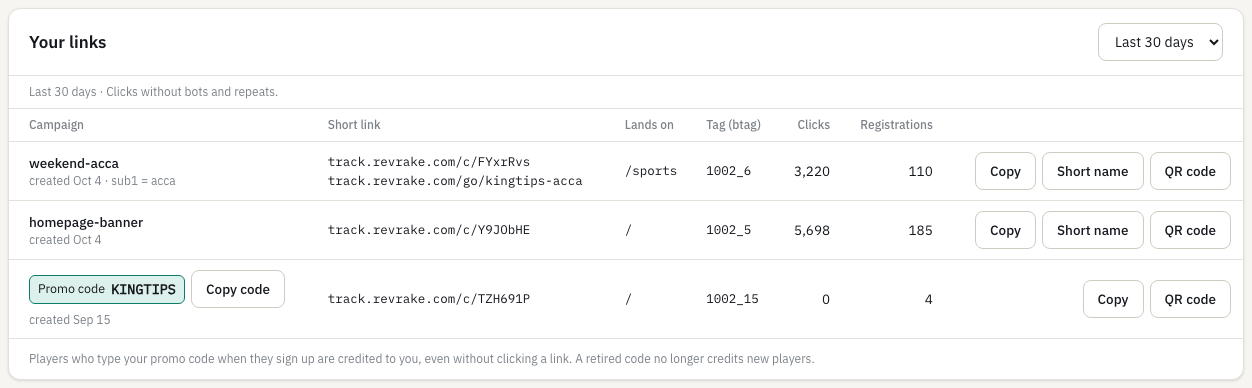
- An affiliate gives a link a readable name, such as track.revrake.com/go/my-stream, to say on a stream or print on a flyer: 3 to 40 lowercase letters, digits and hyphens, one link per name. It is counted exactly like the link itself, which keeps working under its code.
- QR codes
- Every tracking link and referral link has a QR code, drawn in the browser and downloaded as PNG for screens and print or SVG for any size. A scan is a click on the link.
- A tracking domain of your own
- A brand can serve its tracking links and short links from its own domain: add a CNAME to the tracking host, verify it, and the certificate is set up automatically on the first visit.
- Tracking health alert
- When a brand's links get clicks but no registration arrives for the hours you set, you see a banner, admins get an email and your webhooks hear it. It clears by itself with the next registration.
Events
How your platform tells RevRake about players, and how your own systems hear back.
- Signed server-to-server events
- Registration, deposit, chargeback and net gaming revenue, sent as signed requests with a key, a timestamp and a signature: one event per request, or up to 1,000 in a batch. Sending the same event twice changes nothing.
- Daily CSV files
- For platforms that cannot send real-time events: upload the daily registration and sales files your platform already exports (the Raventrack REG and SALES shape), or have your platform push them by API. A file sent twice is never counted twice. Dates without a UTC offset are read on the clock your platform writes its files on: UTC, or the file timezone you set.
- Scheduled file fetch
- RevRake fetches yesterday's daily file every day, at the time you set, from the address your platform publishes it at, with a user name and password or a token over HTTPS. A missing file is tried again every hour, and the admins get one email when it is 3 hours late.
- An inbound log
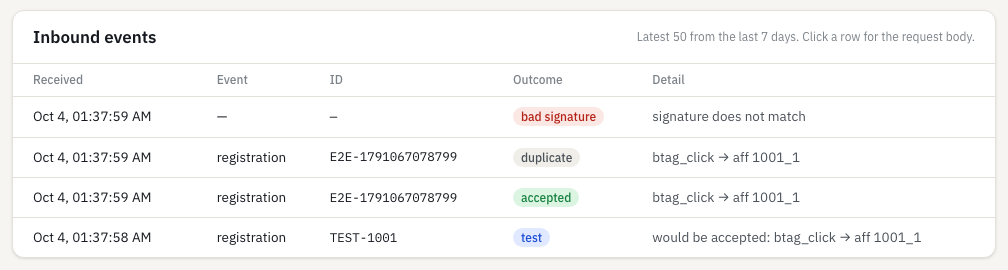
- Every request is listed with its outcome and the reason, including the ones that were refused.
- A read API for reports and commissions
- Your backend reads the reports and the commission ledger with signed requests, as JSON or CSV, at up to 120 reads a minute per key.
- A key per affiliate
- Each affiliate issues their own key. It reads only that affiliate's reports and commissions and cannot send events. The operator key is never shared.
- Webhooks to your own systems
- A signed JSON request to your own address when an affiliate applies or is approved, rejected or suspended, a player registers, a commission is created, approved, rejected, paid or reversed, or a payout batch is closed, approved or paid. Retries, a delivery log and a test button.
- Nightly export to your data warehouse
- Each night the day's clicks, players, events and commissions go to your own S3-compatible bucket as gzipped CSV files with a manifest, per brand. A failed night is retried every hour, and the last seven days are caught up.
- Program lists in the API
- Your backend reads affiliates, links and deals with the same signed requests as reports, and filters reports and commissions by group.
- Bring your history over
- Moving from another system: import each affiliate's past months from a CSV file. Paid months become paid lines, the last balance carries into your first close here, and a dry run shows the result first.
- Alerts in Slack or Microsoft Teams
- Any webhook event as a chat message instead of signed JSON: big first deposits from an amount you set, fraud flags, affiliate postbacks switched off and late daily files.
Attribution
Deciding which affiliate brought a player, by a rule both sides can read.
- Matching by click ID or btag
- A registration is matched to a click by its click ID or its
btag, inside the attribution window. Last click is the default. - A policy affiliates can read
- The rule in effect (which click counts, the window, and which wins when a click and a btag disagree) is shown to each affiliate in plain words on their dashboard, with a dot when it changes; each approved affiliate is also emailed the new rule.
- Attribution options
- You choose last click or first click, a window of 1 to 365 days, and whether the click or the btag wins when they point to different affiliates. With first click, the visitor's earliest counted click inside the window, from the same address and device, wins over the later one your platform reports. Each change is a new version that applies to registrations from then on; players already credited keep their decision. A deal can set its own window, which replaces the policy's for its affiliates' links, and the policy can let a promo code win over a click or a btag.
- A reason on every decision
- Each attributed or unattributed player records why, so a dispute starts from the same facts.
- Promo codes
- A code the player types at sign-up credits them to an affiliate's link when no click ID or btag does. Sent with the registration or in the REG file. Codes are not case-sensitive, and a retired code credits nobody new and is never used again.
Commissions
What you owe, and the record of how it was worked out.
- CPA commissions
- A first deposit that reaches the amount set in the deal earns the referring affiliate one CPA commission, once per player.
- Hold period
- Each commission starts on hold for the number of days set in the deal. When the hold period ends, it is approved automatically.
- Chargeback reversal
- A chargeback on the first deposit cancels a held commission, or adds a reversal row against one already approved.
- Deal versions
- Changing a deal makes a new version. Past commissions keep the terms they were earned under.
- An append-only ledger
- Rows are never edited or deleted; a correction is a new row. You and the affiliate see the same ones, with search, sorting and paging.
- A currency per deal
- Each deal has its own currency, the one the affiliate earns and is paid in. Deposits in other currencies are converted at that day's exchange rate; rates are refreshed hourly, and you can set your own rate for a day. Totals are shown in your workspace's reporting currency at the rate of the day each commission was earned, so past totals never move.
- Revenue share
- A share of each player's net gaming revenue per day or month, reported by signed events or the daily file. A corrected figure is recorded as an adjustment. What happens to a losing month is a setting of the deal.
- Monthly close and payouts
- Each month closes into a payout batch with one line per affiliate and currency; amounts below the minimum payout carry forward. You approve the batch, download a bank file (CSV), pay outside RevRake and mark it paid. Affiliates see their payout history and enter where to be paid. The bank file also carries the coin, network and memo of crypto payouts. RevRake never moves money itself.
- Payment terms
- You set how many days after the month closes its payouts are due, from 0 to 120. Every payout line carries its due date.
- A minimum and terms per affiliate
- An affiliate can have their own minimum payout and their own payment terms instead of the program's. The next monthly close uses them.
- Statements
- Every payout line has a statement, for you and for the affiliate: the month's commissions by type, what earlier months carried in, what it pays, when it is due and was paid, and every row behind it. Printable, or saved as a PDF from the browser. With invoicing on, it prints as a self-billed invoice.
- Deal tiers by volume
- A deal can pay a higher CPA, a higher revenue share, or both, once an affiliate brings a set number of new depositing players in a calendar month. The whole month is then paid at the tier, not only the players above it. The difference is added to the ledger as new rows; nothing already written changes. Affiliates see the tiers of their deal and their progress this month.
- Countries a deal does not pay for
- A deal can list countries it does not pay for. A player from one is still recorded and attributed, and earns nothing on that deal. The player's country comes from the registration event, the REG file or the click.
- Payouts by bank, mobile money, crypto or e-wallet
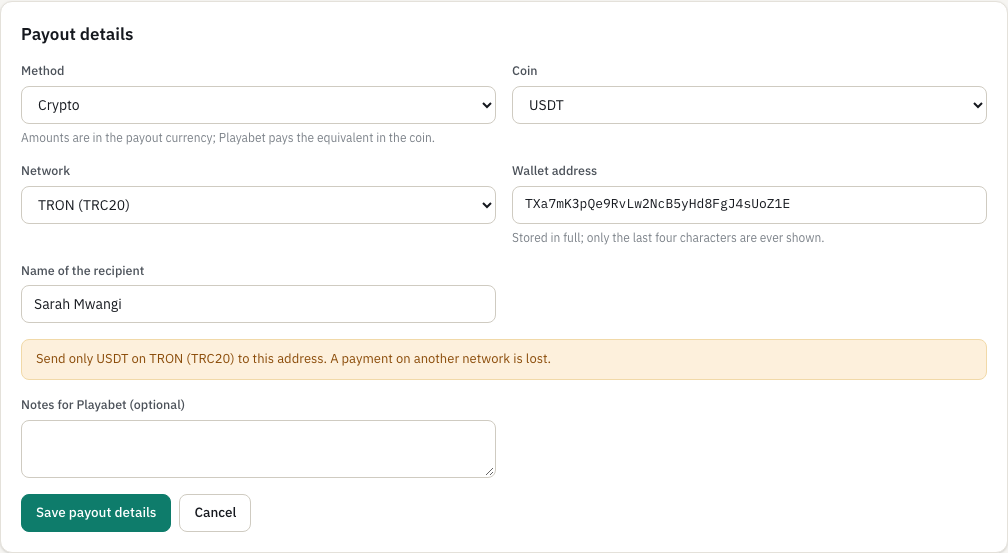
- You choose the methods your program pays by, and each affiliate picks one. Crypto: USDT, USDC, BTC, ETH, SOL, BNB, TRX, LTC, TON or XRP, on a network that coin is sent on (TRON, Ethereum, BNB Smart Chain, Solana, Polygon, Arbitrum, Base, TON, Bitcoin, Litecoin or the XRP Ledger), with the wallet address checked against that network's format and a memo where the network needs one. Amounts stay in the deal's currency; you pay the equivalent in the coin. E-wallets: PayPal, Skrill, Neteller, Wise, Payoneer, Revolut or another.
- Deal history for affiliates
- Each affiliate sees every version of their deal, newest first, with what changed in plain words, including a version scheduled to start later. Before you publish a new version, the deal form shows its changes for you to confirm.
- Losing months, per deal
- Each deal says what happens to a month that ends below zero: it carries forward into later payouts (the default), carries forward up to a cap with the rest written off, or is written off at the close. The setting is part of the deal version, so the affiliate sees it, and statements show what was written off.
- Self-billed invoices
- Switch invoicing on with your legal name, address, tax ID and a prefix. Approving a batch then gives each payable line the next invoice number, such as INV-000001, issued in the affiliate's name to you. Affiliates enter their billing details in their portal. You and the affiliate print the invoice from the line's statement.
- Take a commission back, with a reason
- An admin takes a commission back with a reason (player self-excluded, duplicate account, bonus abuse, fraud, chargeback, breach of program terms, test account or other) and a note. One not yet in a payout is rejected; one already in a payout or paid stays, and a reversal row nets it against the next payout. The affiliate sees the reason and the note in their ledger and on the statement, and their tracker and your webhooks are told.
- How each commission was calculated
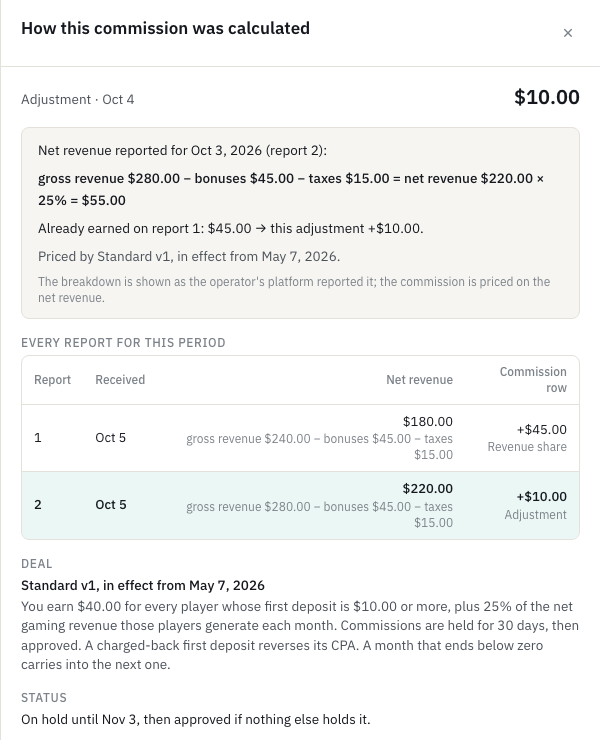
- Every ledger row, for you and for the affiliate, opens the chain behind it in plain words. For a CPA: the first deposit against the deal's minimum, and the deal version that priced it. For revenue share: the period's gross revenue, bonuses, fees and taxes when your platform reports them, the net revenue, the rate, and every corrected report with the row it produced.
- Payout lines in plain words
- Each payout line says where it stands: waiting for the month to close, in a batch not approved yet, approved and expected by a date, paid on a date, held for an identity check or for open flags, waiting for payout details, or carried to next month.
- Preview of the monthly close
- See what the close would pay, carry or hold for each affiliate before it runs. Nothing is written.
- PDF statements and invoices
- Every statement and self-billed invoice downloads as a PDF in the reader's language. Affiliates get an email with the link when their payout is approved.
- A statement every month
- Every approved affiliate gets a line and a statement each month, even when nothing was earned, so the record has no gaps.
- Balance ledger
- Month by month, the same for you and the affiliate: the opening balance, what each close added by kind, payments with their date and reference, and the closing balance. Downloadable as CSV.
- Payments with a date and a reference
- Mark a line paid from the bank file, or record a payment made outside RevRake, with the date, the method, the reference and a note for your team.
- Manual adjustments with a second approval
- An admin adds or takes off an amount with a reason and a note the affiliate reads. From an amount you set, a second admin approves it first, and the affiliate sees it only then.
Fraud checks
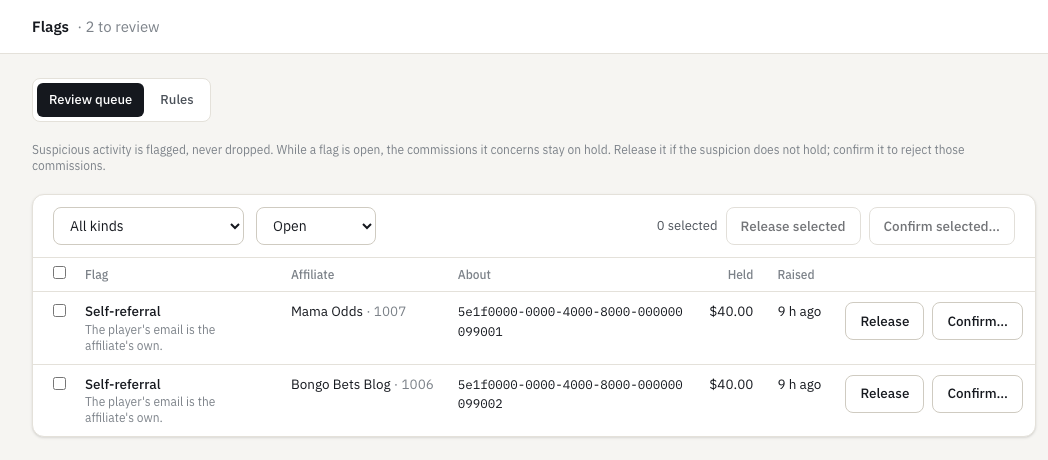
Suspicious activity is flagged for you to review. Nothing is dropped on its own.
- Self-referral
- Flags a player whose details match the affiliate's own.
- Click bursts
- Flags an unusual run of clicks on a link in a short time.
- Repeated first deposits
- Flags a second "first" deposit for the same player. It never pays.
- Review, then release or confirm
- While a flag is open the commissions it concerns stay on hold. Release it if the suspicion does not hold; confirm it to reject them.
- Optional fraud rules
- Off until you switch them on: paid ad clicks, throwaway email domains, a registration country that differs from the click's, a registration within seconds of the click, and a payout account another affiliate already uses.
- Flag expiry and bulk decisions
- An open flag can decide itself after a number of days you choose, released or rejected. In the review queue, release or confirm up to 200 flags at once.
Compliance
The records a regulated operator has to keep.
- Affiliate licence records
- Where a market requires it, you record an affiliate's licence number, jurisdiction and expiry date. The affiliate list shows the licence and marks one that has expired.
- An audit log
- Every change made in your workspace is recorded: who, when, what, and the details. Bank details are never copied into it. An affiliate changing where they are paid is recorded too. Admins see the log and can download it as a CSV file; nobody can edit or delete it.
- Hold payouts until identity is checked
- Switch it on and an affiliate's payout is held at the monthly close until you record that their identity was checked, with a note. You check identity in your own process; RevRake records who recorded it and when. Recording the check releases the payout in batches not yet approved.
- Formula-safe CSV files
- Every CSV download (the bank file, payout rows, reports and the audit log) neutralises cells that a spreadsheet would run as formulas. Account numbers stay exact.
- Versioned program terms
- Publish your program terms as versions. Affiliates accept a new version before their portal opens again, and you see who accepted which version and when.
- Second approval for large payout batches
- From an amount you set, the admin who closed a payout batch cannot approve it alone; another admin does.
Postbacks
Conversions reported to the tracker each affiliate already uses.
- Postbacks to the affiliate's own tracker
- Each affiliate adds their postback URL with macros. Presets for Keitaro, Binom, Voluum, RedTrack, BeMob, PeerClick and FunnelFlux Pro.
- Retries and a delivery log
- A failed delivery is retried on a schedule. Every attempt is recorded with the tracker's response, so a missing conversion can be traced.
Reports and dashboards
How your program is doing and where the money stands, for you and for each affiliate.
- Reports
- Clicks, registrations, first deposits and earnings by day, link, sub-ID, country and affiliate, with CSV export, for you and for each affiliate's own traffic.
- Affiliate leaderboard
- Every affiliate's clicks, registrations, first deposits, earnings, chargebacks and share of flagged clicks over 7, 30 or 90 days, each with the change against the period before, and a funnel for the whole program. An affiliate with many flagged clicks or chargebacks is highlighted.
- Money overview
- Per currency: what is on hold, approved and waiting for the monthly close, in a batch not yet paid, and paid this month. Which holds become payable in each of the next 8 weeks, what is held for a person to review, and the date of the next close.
- Player value by registration month
- Players grouped by the month they registered: how many deposited, what affiliates earned on them, and the net revenue they brought in each month since, per currency. For the whole program or for one affiliate.
- Affiliate dashboard and earnings forecast
- Each affiliate sees today, the last 7 days and this month, a chart of the last 30 days, and a forecast of their earnings: on hold, approved, the holds becoming payable each week, and the date of the next payout close.
- The affiliate's players
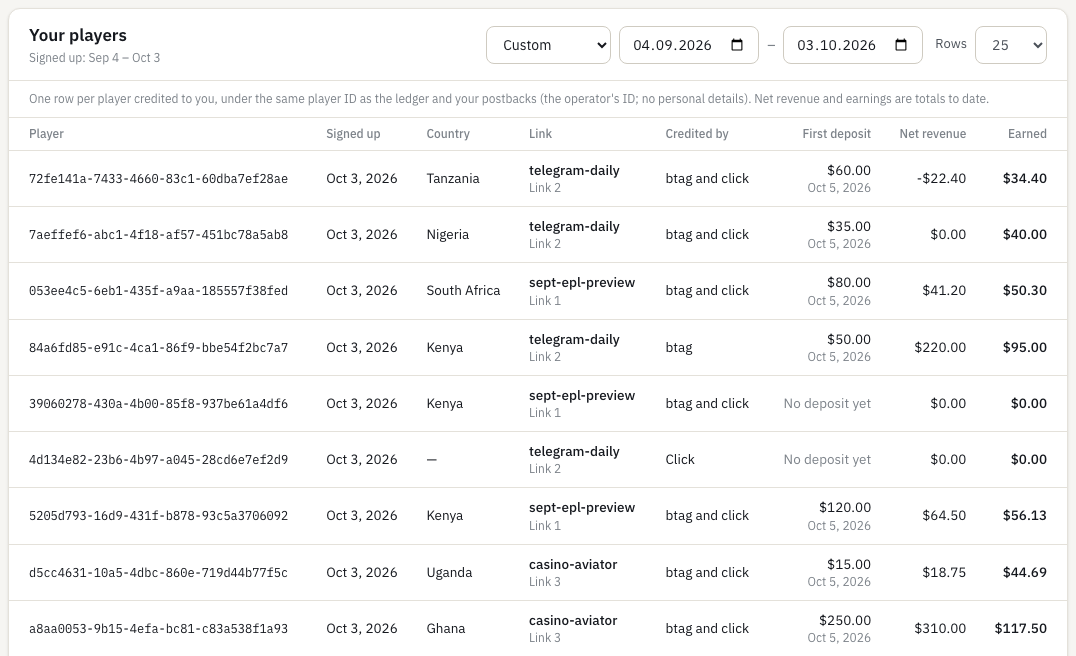
- A Players tab with one row per player the affiliate brought: the player's reference, sign-up date, country, how they were credited and by which link, the first deposit, the latest net revenue, the commission earned and any rejected rows, for any date range. Each row leads to its commissions in the ledger.
- Click time on each player
- Each player row shows when the click that brought them happened, beside the sign-up date, for you and for the affiliate.
- Owed by month
- The money overview shows what you owe affiliates by the month it was earned, so old balances stand out.
- Results per creative
- The link an affiliate copies with a banner or a landing page names the creative, so reports show clicks, registrations, first deposits and earnings per creative, for you and for each affiliate.
- Value by days since sign-up, and payback per deal
- Each registration month's net revenue at 30, 60, 90 and 180 days, the bonus cost your platform reported and the net profit; and per deal, what its CPAs cost against the net revenue of those players and the month they paid back.
- A player quality score per affiliate
- 0 to 100 on the leaderboard, 50 being your program's average, from first deposits per registration, deposits per depositing player, net revenue per first deposit and the share of flagged clicks.
- Results by attribution channel
- Registrations, first deposits and earnings by how each player was credited: click ID, btag, promo code or first click.
- Scheduled reports by email
- A report grouped one way, weekly or monthly, sent as a CSV file to up to ten addresses.
Working with affiliates
Talking to your affiliates, checking the material they make, and letting them bring others.
- Sub-affiliates, one level
- Switch it on with a share from 0 to 50%. Each affiliate gets a referral link and a QR code; whoever applies through it is reviewed like any applicant. At each monthly close the referrer earns the share of each referred affiliate's net for the month when it is above zero, as its own line on their payout and statement. The referred affiliate's earnings do not change.
- Approval of affiliates' own material
- Affiliates submit the banners, landing pages, ads and social posts they make, with an image or an address. You approve or reject what is waiting and withdraw what was approved, many at once; a rejection or withdrawal needs a reason the affiliate reads. Each decision is emailed to the affiliate in their language.
- Announcements to affiliates
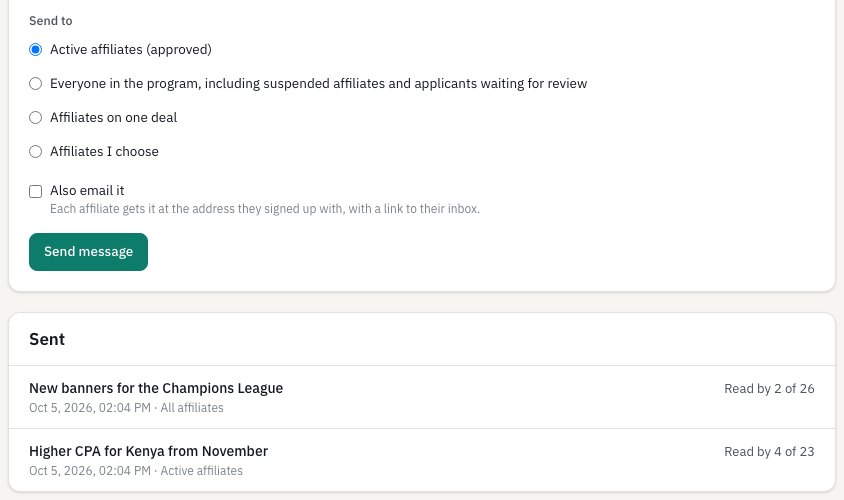
- Write to all affiliates, the active ones, the ones on one deal, or the ones you choose. The message lands in their portal inbox, and by email in their language when you tick the box. You see how many have read each one.
- An inbox for affiliates
- Affiliates read your messages in their portal, with the unread ones marked.
- Private notes per affiliate
- Your team keeps notes on each affiliate, such as an agreed rate or a call. The affiliate never sees them.
- Affiliate groups and account managers
- Put affiliates in groups such as influencers or tipsters and give each an account manager. Every list and report, and the leaderboard, filters by group or by your own affiliates. A group can give new affiliates a default deal and a manager, see creatives meant only for it, and receive messages, and it has a report against the period before.
- Questions on a line
- An affiliate questions a commission or a statement line. You both write in one thread, and an admin closes it with an answer, no change, or an adjustment. Each side is emailed.
- Prospects
- The people your team talks to before they apply, with an owner and a note. When an account with the same email appears, the prospect shows it; inviting one creates it.
- Dormant and declining affiliates
- A filter and a badge for affiliates with no click or registration in 30 days, and for those whose first deposits fell below half of the 30 days before.
- Tasks per affiliate
- What to do for an affiliate, by when, and who does it, with overdue ones in red.
- Automatic messages
- Three rules you word and switch on: no clicks in 30 days, close to the payout minimum, and licence expiring. Each reaches an affiliate at most once a month, in the inbox and by email if you choose.
Portals
One for you, one for your affiliates, at app.revrake.com.
- Operator portal
- Dashboard with the affiliate leaderboard and the money overview, brand (logo, colour and tracking domain), deals, affiliates with private notes, creatives and submitted material, promo codes, messages, commissions, payouts, reports, player value, flags and fraud rules, integration (keys, files and webhooks), settings (timezones and exchange rates), team, audit log and your account with two-factor sign-in.
- Affiliate portal
- A dashboard with an earnings forecast and the attribution rule, the deal with its tiers, this month's progress and its history, tracking links with short names and QR codes, creatives and their own submitted material, clicks, players, commissions with their status and calculation, payouts, reports, postbacks, messages and referrals. It uses the width of a large screen, and shows your logo and colour.
- Applications and approval
- Affiliates apply on your program page, which shows your default deal, every listed deal for them to choose from, or no terms. Close it and the program is invite-only. You approve or decline each one, and can suspend and reinstate an affiliate later; the reason is emailed to them.
- Per-deal invite links
- Send an affiliate a link that joins them to a specific deal.
- A team with two roles
- Invite colleagues by email. Admins change money and settings; members can read and approve affiliates. An admin can change a role or remove someone, and the last admin cannot be removed.
- Phone layout
- Both portals are built to be used on a phone, not only opened on one.
- What is new since you last looked
- A dot in the menu marks each section with something new since you last opened it. For you: applications, flags, commissions, batches to approve and refused events. For an affiliate: commissions, payouts, creatives, deal changes and failed postbacks. Each person has their own.
- The platform in six languages
- The platform is in English, Portuguese, Spanish, French, Russian and Turkish. The language is chosen on the sign-in page or in each person's account, and saved with the account, so every device they use follows it.
- A workspace timezone
- You choose the timezone of your workspace. Days in reports and the monthly close follow it. Each person can also see times in their own timezone, saved with their account.
- Self-serve sign-up
- You create your program yourself: sign up with your email, confirm it with the link we send, and you are in. No card, and nobody to wait for.
- Emails in six languages
- The emails RevRake sends are written in the same six languages as the platform.
- Creatives
- You list banners and landing pages. A banner image is uploaded to RevRake or kept on your own address. Each affiliate picks one, combines it with their own tracking link and copies ready-made HTML.
- Banner image upload
- Drag and drop a PNG, JPEG, GIF or WebP of up to 2 MB. RevRake checks the file, reads its width and height, stores it and serves it at a permanent address that affiliates can use.
- Your logo
- Upload your logo: PNG, JPEG, GIF or WebP, up to 2 MB. It is shown on the affiliate portal, the join page, the account chooser, statements and your own sidebar.
- Your colour on the affiliate portal
- Pick your program's colour, with presets, a preview and a contrast warning. Affiliates see it on their portal and on your join page: buttons, the active tab and links. Your own portal keeps RevRake's colours.
- What each number means
- A glossary of the terms both portals use, from clicks and first deposits to net revenue, hold and carry, in a drawer beside the numbers and on a page of its own, in six languages.
- Two-factor sign-in
- Operators and affiliates can turn on a six-digit code from an authenticator app. Ten single-use recovery codes are shown once, to copy or download. Turning it off needs the password and a code. API keys keep working as before.
- Several brands in one workspace
- Each brand with its own affiliates, deals, numbering and monthly close, and a switch between them in the portal.
- Creatives with a last day
- Give a creative a last day. The day after, it is archived and every affiliate who used it gets a message in their inbox; their links keep working.
- Email choices for affiliates
- Affiliates choose a daily digest of first deposits and a monthly summary, and can turn off the statement-ready and payment-sent emails.

Tables turn into readable rows, buttons are sized for a thumb, and nothing scrolls sideways. This is the operator dashboard at phone width.
Every way to send data in and get it out.
Use one, or several. All of them are built today and end in the same ledger.
- Real-time signed events Your platform sends each registration, deposit, chargeback and revenue figure as it happens, one signed request per event. How to do it
- Batches of up to 1,000 events The same events in one signed request, for a job that runs every few minutes or for a backfill. Each event is answered on its own. How to do it
- Daily files: pushed, fetched or uploaded Your platform pushes its daily registration and sales CSV files to a signed endpoint, RevRake fetches them every day from an address you give, or someone uploads them on the Integration page. How to do it
- Postbacks to affiliates' trackers Each conversion is sent in real time to the tracker an affiliate already uses, with retries and a delivery log. How to do it
- Reports and commissions by API or CSV Your backend reads reports and the commission ledger with the operator key; each affiliate reads their own with their own key. Or download CSV files in the portal. How to do it
- Webhooks to your own systems Your CRM, data warehouse or chat channel gets a signed request when an affiliate applies, a player registers, a commission changes or a payout is made. How to do it
Not in the product yet.
What is not in the product yet is on the roadmap, as milestones in order. We do not put dates on them.
If something you need is on none of these lists, it is not built and not scheduled. Ask us at hello@revrake.com and you will get a straight answer.
If what is built covers your program, create it for free.
You create your program yourself: sign up, confirm your email, and you are in within a few minutes. Free for operators, forever. No card.
Questions? Write to hello@revrake.com